


' fill='%23fff' stroke='%23707070' d='M0 0h21.6v21.6H0z'/%3e%3c/clipPath%3e%3cclipPath id='c'%3e%3cpath data-name='Rectangle 6531' transform='translate(-6319 -2048)' fill='%23fff' stroke='%23707070' d='M0 0h43.2v21.6H0z'/%3e%3c/clipPath%3e%3cclipPath id='a'%3e%3cpath d='M0 0h21.6v21.6H0z'/%3e%3c/clipPath%3e%3c/defs%3e%3cg data-name='Malaysia -Square' clip-path='url(%23a)'%3e%3cpath fill='%23fff' d='M0 0h21.6v21.6H0z'/%3e%3cg data-name='Mask Group 325' transform='translate(6348 2048)' clip-path='url(%23b)'%3e%3cg data-name='Mask Group 324' transform='translate(-35)' clip-path='url(%23c)'%3e%3cg data-name='Group 21195'%3e%3cpath data-name='Path 14718' d='M-6319-2048h43.2v21.6h-43.2z' fill='%23fff'/%3e%3cpath data-name='Path 14719' d='M-6317.457-2047.229h41.657m0 3.086h-41.657m0 3.086h41.657m0 3.086h-41.657' fill='none' stroke='%23c00' stroke-width='1.543'/%3e%3cpath data-name='Path 14720' d='M-6319-2048h21.6v13.114h-21.6z' fill='%23006'/%3e%3cpath data-name='Path 14721' d='M-6319-2034.886h43.2m0 3.086h-43.2m0 3.086h43.2' fill='none' stroke='%23c00' stroke-width='1.543'/%3e%3c/g%3e%3cpath data-name='Path 14722' d='M-6302.5-2045.686l.344 2.353 1.331-1.967-.714 2.269 2.054-1.2-1.626 1.731 2.372-.19-2.218.858 2.218.858-2.372-.19 1.626 1.736-2.054-1.2.714 2.269-1.331-1.97-.344 2.358-.344-2.353-1.331 1.97.714-2.269-2.054 1.2 1.626-1.737-2.372.19 2.218-.858-2.218-.859 2.372.19-1.626-1.736 2.054 1.2-.714-2.267 1.331 1.97zm-1.929.1a4.114 4.114 0 100 7.521 4.629 4.629 0 110-7.521z' fill='%23fc0'/%3e%3c/g%3e%3c/g%3e%3c/g%3e%3c/svg%3e "malaysiaIcon")
'%3e%3cpath fill='%23fff' d='M0 0h21.6v21.6H0z'/%3e%3cg data-name='067-hong-kong'%3e%3cpath data-name='Rectangle 6488' fill='%23d80027' d='M0 0h22v22H0z'/%3e%3cg data-name='Group 21086' fill='%23f0f0f0'%3e%3cpath data-name='Path 14432' d='M11.911 8.264c-.248 1.032-.689.835-.905 1.735a2.373 2.373 0 011.109-4.614c-.429 1.803.018 1.956-.204 2.879z'/%3e%3cpath data-name='Path 14433' d='M8.606 9.029c.9.555.581.913 1.37 1.4a2.373 2.373 0 01-4.045-2.481c1.577.964 1.866.586 2.675 1.081z'/%3e%3cpath data-name='Path 14434' d='M8.311 12.409c.807-.689 1.048-.271 1.752-.871a2.373 2.373 0 11-3.609 3.081c1.408-1.202 1.136-1.594 1.857-2.21z'/%3e%3cpath data-name='Path 14435' d='M11.435 13.734c-.406-.98.066-1.08-.287-1.935a2.373 2.373 0 111.815 4.385c-.708-1.71-1.165-1.573-1.528-2.45z'/%3e%3cpath data-name='Path 14436' d='M13.66 11.173c-1.058.083-1.007-.4-1.929-.325a2.373 2.373 0 114.731-.371c-1.846.145-1.856.621-2.802.696z'/%3e%3c/g%3e%3c/g%3e%3c/g%3e%3c/svg%3e "hongKongIcon")


Saving for retirement is an essential part of financial planning. In Singapore, the Supplementary Retirement Scheme (SRS) provides a valuable option for individuals looking to enhance their retirement savings. This guide will give you an introduction to SRS and its benefits, how to link your SRS account to FSMOne as well as how to setup ETF RSP on the platform.
1) Benefits of the Supplementary Retirement Scheme (SRS)
The Supplementary Retirement Scheme (SRS) is a voluntary scheme that complements the Central Provident Fund (CPF) and provides several benefits:
a) Tax Relief
Contributions to the SRS account qualify for tax relief. For Singaporeans and Permanent Residents, the yearly cap for contributions is $15,300, while for foreigners, it is $35,700. These contributions help to reduce your taxable income, thus resulting in tax savings.
b) Flexible Investment Options
Funds in the SRS account can be invested in a wide range of financial instruments such as ETFs, Stocks and Unit Trusts. This allows you to grow your retirement savings at a potentially higher rate compared to just leaving your funds in cash in the SRS account as it earns only 0.05% interest p.a. Additionally, you get to accumulate tax-free returns on your investments.
c) Tax-Deferred Growth
Investment returns earned through SRS are not taxed at the point of accumulation, allowing your investments to grow tax-free until withdrawals are made.
d) Partial Withdrawal at Retirement
You can begin withdrawing from your SRS account upon reaching the statutory retirement age. SRS gives you the flexibility to withdraw your SRS funds in cash or investments. The good this is that only 50% of the withdrawals will be taxable. This partial taxation can significantly reduce your tax liability during retirement.
2) How to Set Up an SRS Account with an Agent Bank
To start using the SRS for retirement savings, you must first open an SRS account with one of the three designated agent banks in Singapore—DBS, OCBC, or UOB. Here’s how:
1. Choose an Agent Bank: Select a bank from the available options—DBS, OCBC, or UOB. All three banks provide similar SRS account services.
2. Apply Online or In-Person: You can open an SRS account through the bank's online platform, or you can visit a branch for assistance.
3. Fund Your SRS Account: Once your SRS account is approved, you can make contributions up to the allowed annual limit. The minimum deposit required to start investing varies by bank.
4. Receive Confirmation: After successfully opening and funding your SRS account, you will receive a confirmation from your bank. This is crucial for the next step, which involves linking your SRS account with FSMOne.
3) How to Link Your SRS Account with FSMOne
To invest in ETFs or any other instruments on FSMOne using your SRS funds, you need to firstly link your SRS account with FSMOne. Here's how:
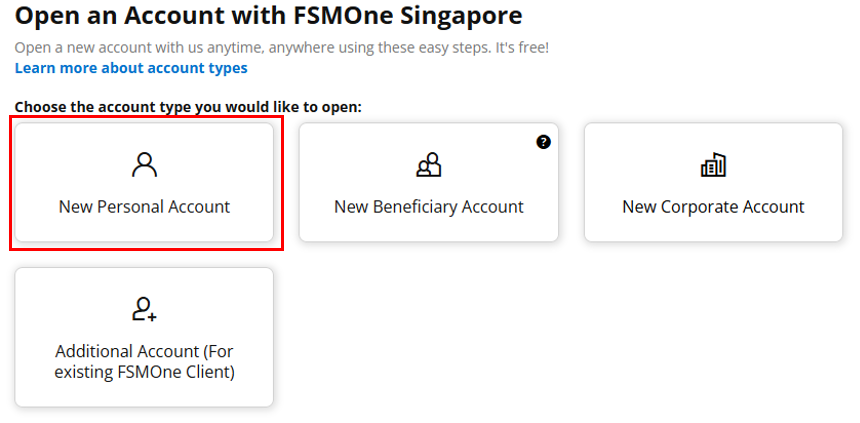
1. Log in to FSMOne: If you don’t already have an FSMOne account, create one by signing up on the FSMOne website here and choose New Personal Account if you are totally new to FSMOne.
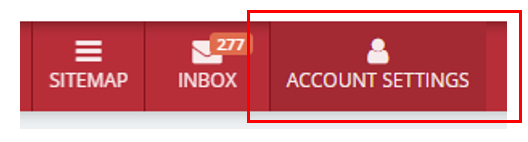
2. Go to “Account Settings”: Navigate to the account settings section near the top right hand corner after logging in.
3. Next to SRS, click on “Your Linked Account (For Personal Account Only)”: Under Activated Services, there is an option to link your SRS account to your FSMOne account.

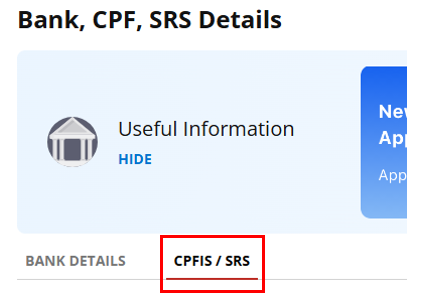
4. Click on CPFIS / SRS: Under Bank, CPF, SRS Details, click on the tab CPFIS / SRS.
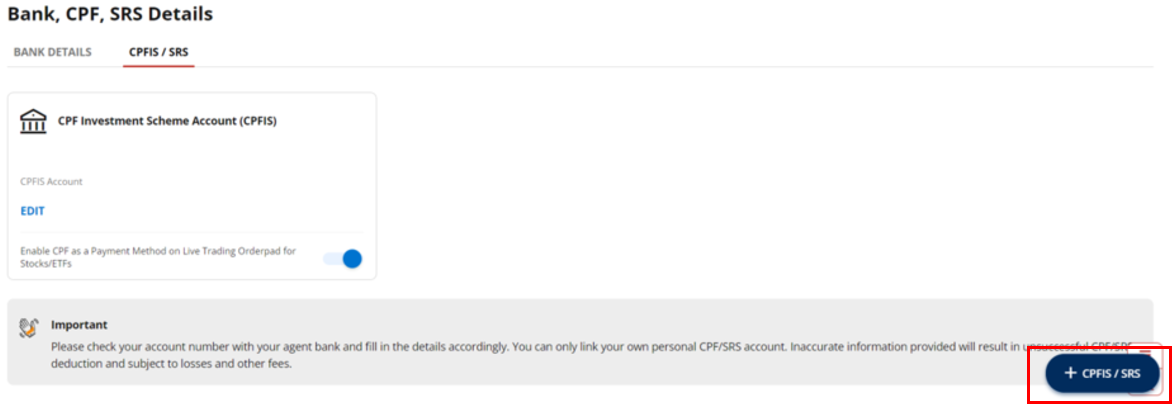
5. Click on + CPFIS / SRS: On the bottom right, look for the blue button with “+ CPFIS / SRS” to add your SRS account
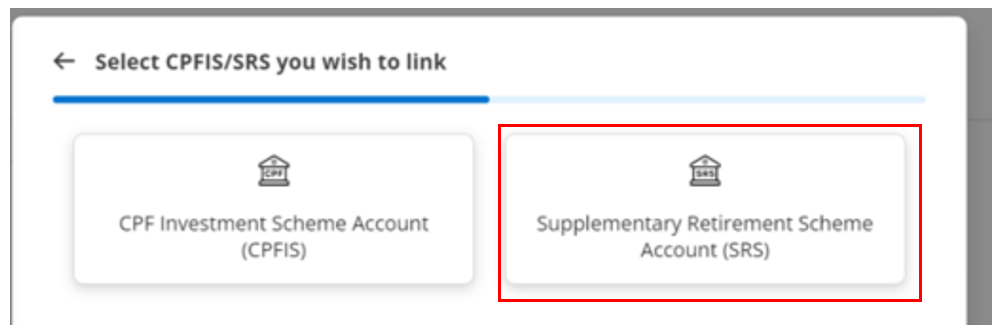
6. Click on Supplementary Retirement Scheme (SRS)
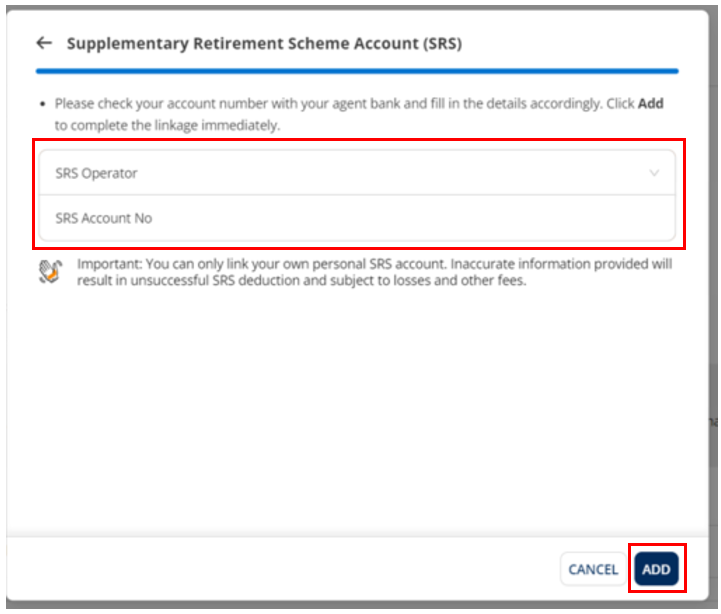
7. Input your SRS details: Select
your agent bank (DBS, OCBC, or UOB) from the drop-down menu under “SRS
Operator”, and input your SRS account number under “SRS Account no”. Once done
click on “ADD” below
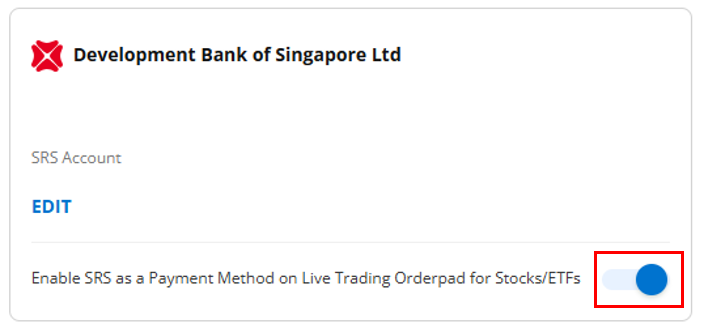
8. Select “Enable SRS as a Payment Method on Live Trading Orderpad for Stocks/ETFs”: This will allow you to use SRS to invest in Stocks/ETFs.
4) How to apply for ETF RSP using SRS on FSMOne Platform
We have recently added SRS as a payment method for ETF RSPs to provide you with more options to invest your SRS monies in a disciplined manner. RSP is a convenient way to dollar cost average your investments. And the best part? You can just automate it and slowly let time work its magic on your investments.
You can follow these steps to set up an ETF RSP using your SRS account:
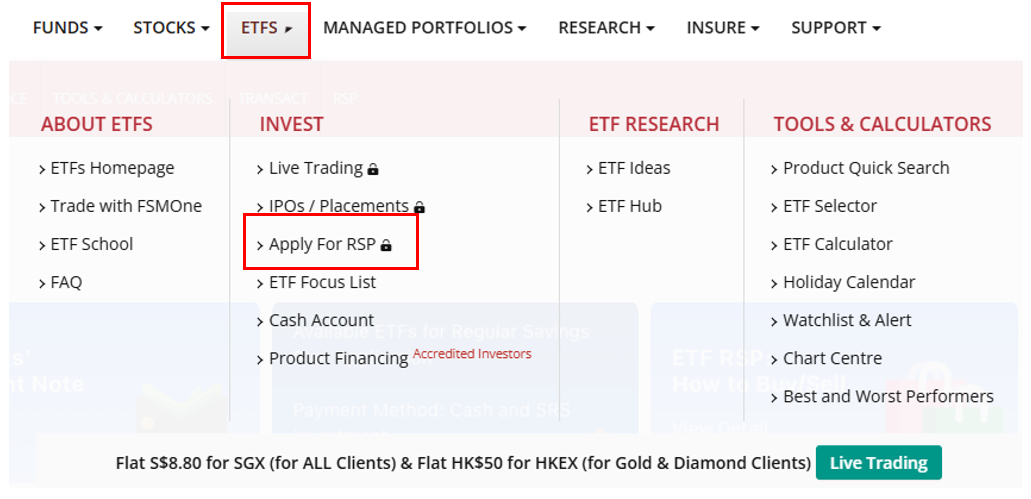
1. Log in to your FSMOne Account and go to the ETFs > Apply for RSP
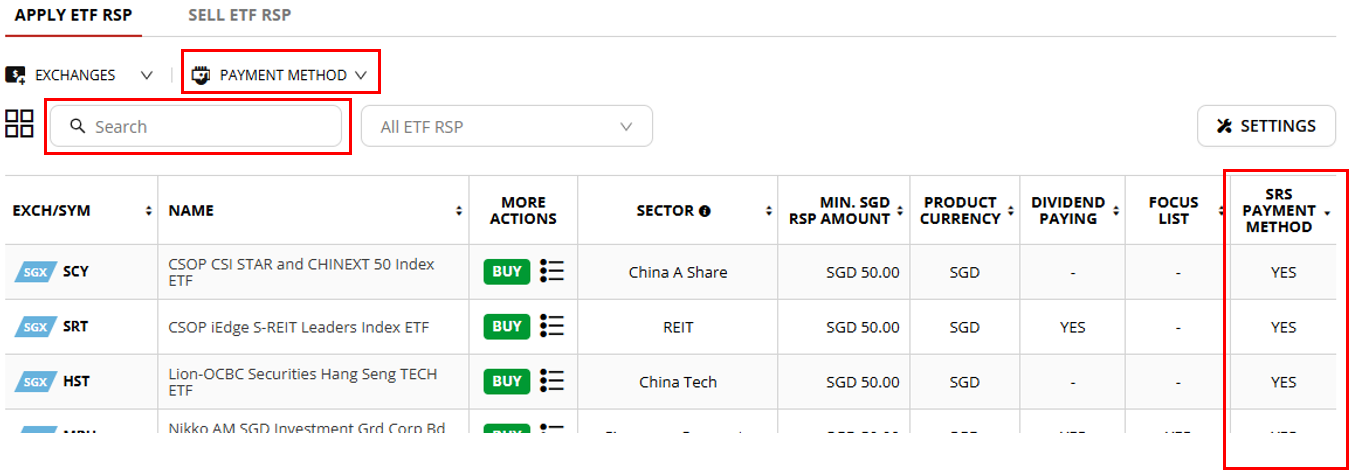
2. Search for the ETF that you want to invest in in the Search box. For ETF RSP, those that can use SRS as payment method will be indicated with “YES” under “SRS Payment Method”. You can also filter for all SRS enabled ETF RSPs under “Payment Method”
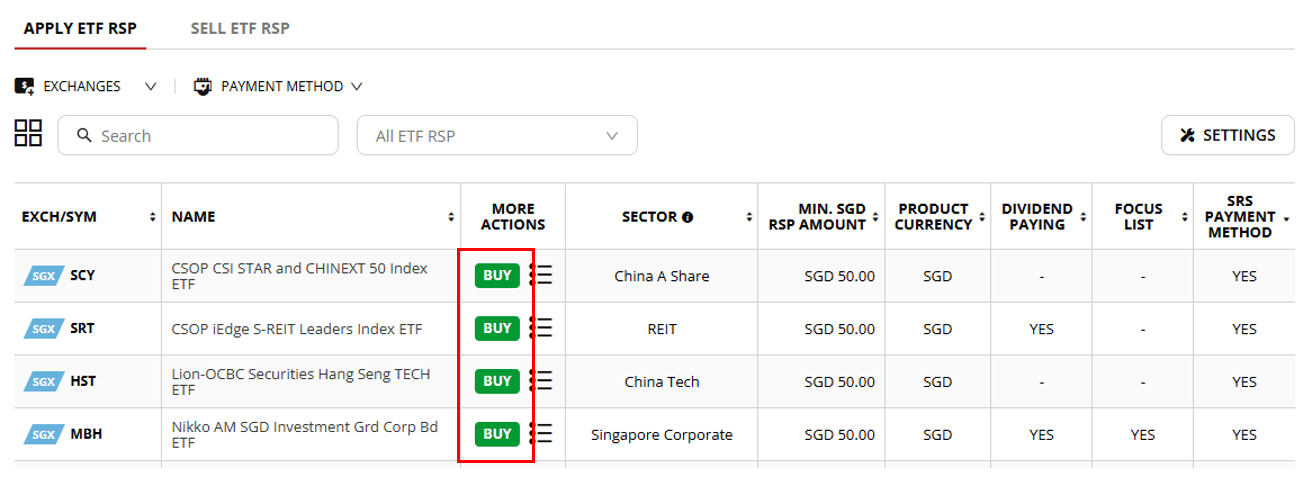
3. Click on BUY next to the ETF that you want to apply RSP
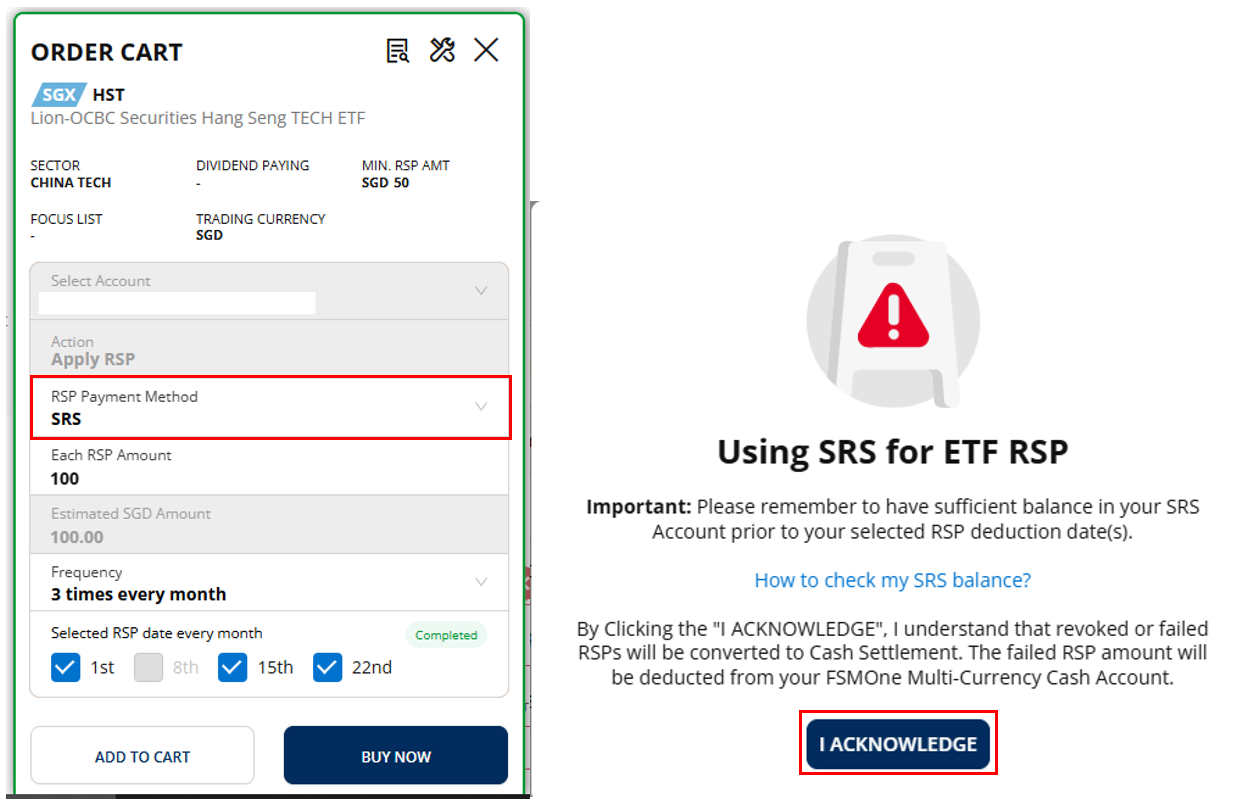
4. An Order Cart will pop up on the right side. Select 'SRS' under “RSP Payment Method”. An acknowledgement window will popup, please read the contents carefully and check your SRS balance before you place your order. Click on “I ACKNOWLEDGE” once you are ready.
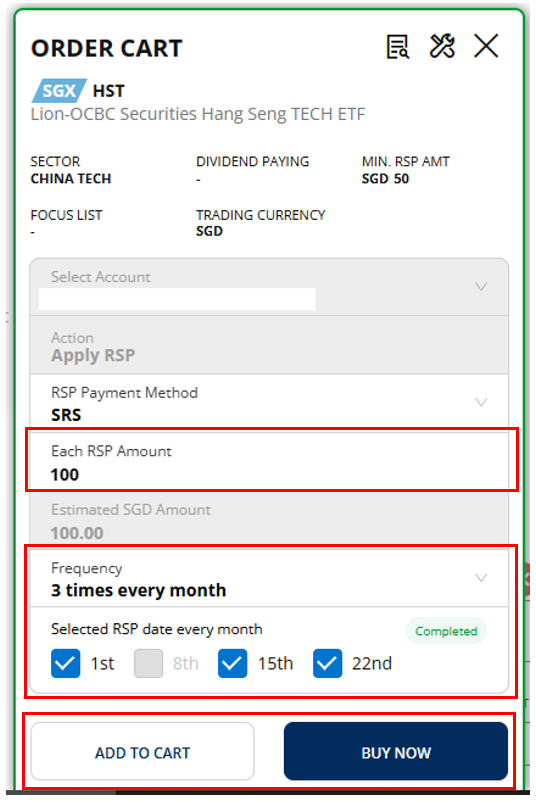
5. Input the RSP Amount and the Frequency and select your preferred date(s) for your RSP deduction. Then click on “ADD TO CART” if you wish to place another ETF RSP order or click on “BUY NOW” to place the order.
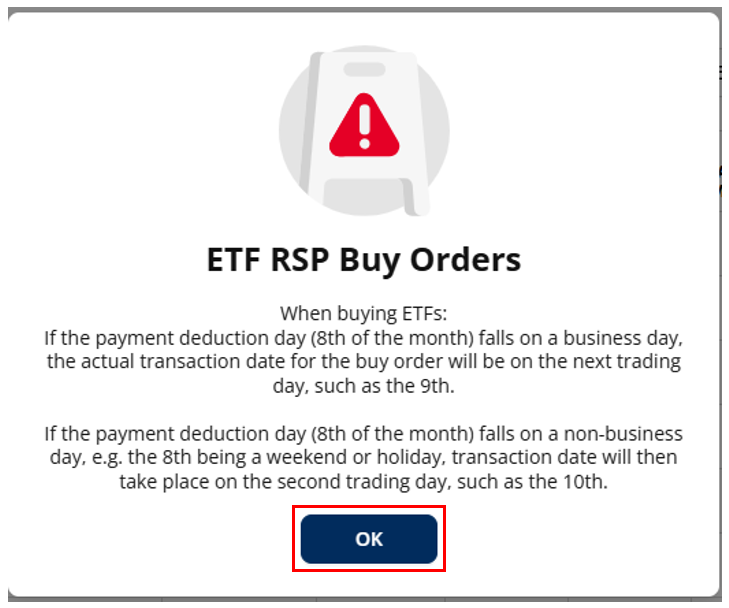
6. Another window will pop up on more information of ETF RSP Buy Orders, please read the contents carefully and click on “OK” once you are ready.
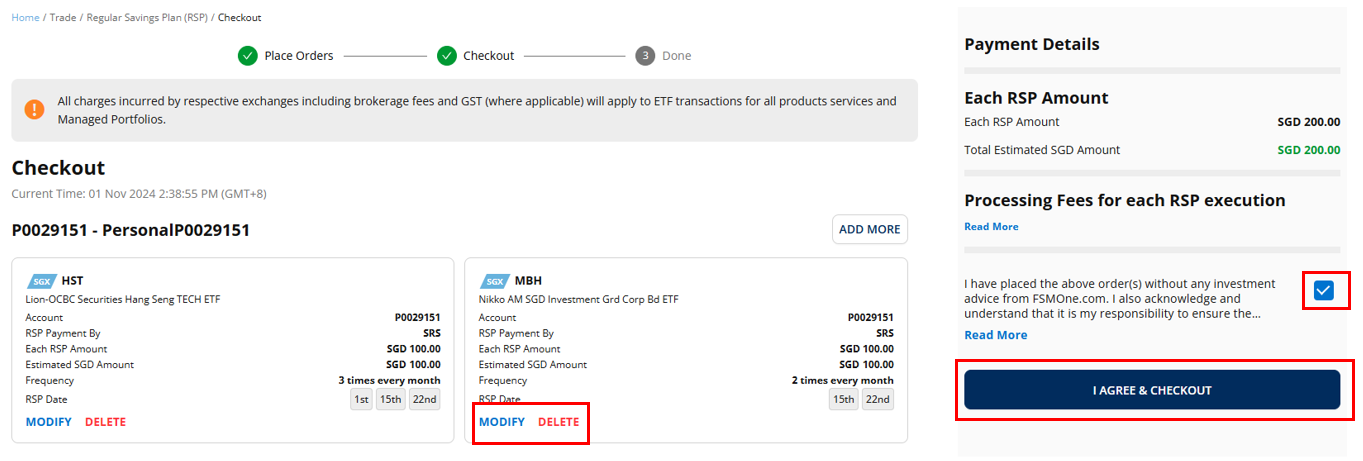
7. On the Checkout page, please check your orders on the left side and ensure they are correct. You may modify and delete the orders if needed. On the right side, check the box next to the acknowledgement and then click on “I AGREE & CHECKOUT”
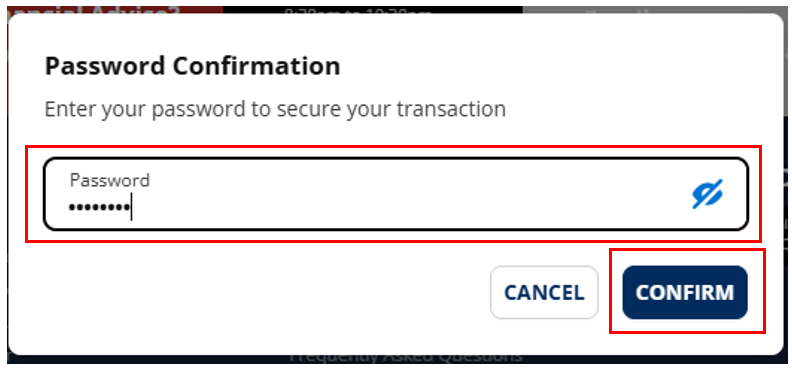
8. Another window will pop up, input your login password and then click “CONFIRM” to complete the checkout
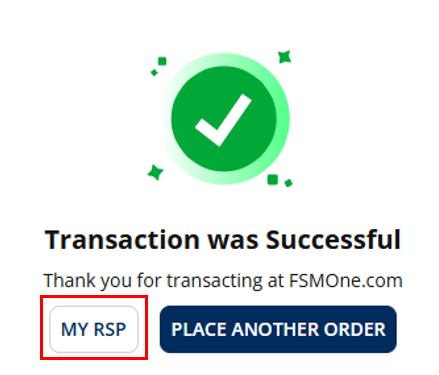
9. Once completed, you should see the below screen. You can go to MY RSP to see the orders you placed and your active RSPs
5) Important Notes regarding ETF RSP using SRS
Trade Conversion
Your SRS trades may be converted to Cash Trades in the following situations:
· Incorrect SRS account details with FSMOne
· Insufficient investible balance in SRS account for buy trade (inclusive of your agent bank charges)
· Insufficient shares in SRS account for sell trade
· Contra trades detected
Kindly ensure sufficient balance in your SRS account prior to the selected RSP deduction date (e.g., 1st/8th/15th/22nd). Insufficient balance in your SRS account will result in the trade being converted to Cash mode and the RSP amount will be deducted from your Cash account.
Click here to find out how to check your SRS balance.
Click here to find out what you should do if your SRS trade has been converted to Cash Trade
RSP Transactions
When buying ETFs:
· If the payment deduction day (8th of the month) falls on a business day, the actual transaction date for the buy order will be on the next trading day, such as the 9th.
· If the payment deduction day (8th of the month) falls on a non-business day, e.g. the 8th being a weekend or holiday, transaction date will then take place on the second trading day, such as the 10th.
When selling ETFs:
· Do ensure that you log in to your SRS agent bank to verify your holdings before placing your sell order
6) Enjoy 0% Processing Fee on ETF RSP Promotion on FSMOne
FSMOne is currently offering a 0% Processing Fee Promotion for ETF RSPs until end of 2024 and it is applicable to SRS ETF RSP as well!
This promotion allows you to maximize your investment returns without worrying about incurring additional fees, making it an ideal time to start or enhance your retirement investment strategy through SRS and FSMOne. It is based on the concept of Dollar Cost Averaging (DCA) which is a proven strategy that helps investors avoid timing the markets and make disciplined regular investments.
Choose among the SRS-eligible ETFs listed on SGX to get started today!

' d='M0 0h300v57H0z'/%3e%3c/svg%3e "sgFsmLogoEnIcon")


'%3e%3cpath fill='%23fff' d='M0 0h21.6v21.6H0z'/%3e%3cg data-name='141-singapore'%3e%3cpath data-name='Rectangle 6502' fill='%23f0f0f0' d='M0 0h22v22H0z'/%3e%3cpath data-name='Rectangle 6503' fill='%23d80027' d='M0 0h22v10H0z'/%3e%3cg data-name='Group 21092' fill='%23f0f0f0'%3e%3cpath data-name='Path 14455' d='M2.917 5.365A3.128 3.128 0 015.374 2.31a3.128 3.128 0 100 6.11 3.128 3.128 0 01-2.457-3.055z'/%3e%3cpath data-name='Path 14456' d='M6.939 2.46l.222.683h.718l-.581.422.222.683-.581-.422-.581.422.222-.683-.581-.422h.718z'/%3e%3cpath data-name='Path 14457' d='M5.193 3.801l.222.683h.718l-.581.422.222.683-.581-.422-.581.422.222-.683-.581-.422h.718z'/%3e%3cpath data-name='Path 14458' d='M8.68 3.801l.222.683h.718l-.581.422.222.683-.581-.422-.581.422.222-.683-.581-.422h.718z'/%3e%3cpath data-name='Path 14459' d='M8.01 5.811l.222.683h.718l-.581.422.222.683-.581-.422-.581.422.222-.683-.581-.422h.718z'/%3e%3cpath data-name='Path 14460' d='M5.863 5.811l.222.683h.718l-.581.422.222.683-.581-.422-.581.422.222-.683-.581-.422h.718z'/%3e%3c/g%3e%3c/g%3e%3c/g%3e%3c/svg%3e "singaporeIcon")


' d='M0 0h67v14H0z'/%3e%3c/svg%3e "msFooterLogoIcon")
